HTTP 403 Forbidden: What It Means and How to Debug It with RequestBin
Seeing “403 HTTP Forbidden”? Learn what it means, 401 vs 403, common causes, and a step‑by‑step workflow to debug 403s using RequestBin.

When you build or integrate APIs, few messages are as frustrating as “403 HTTP Forbidden.” This guide explains what a 403 Forbidden is, how it differs from 401 Unauthorized, and—most importantly—how to debug it efficiently using RequestBin. We’ll cover real‑world causes, a practical inspection workflow, and copy‑paste code you can use right now.
Who is this for? Developers shipping APIs, backends, webhooks, or third‑party integrations who need a clear, repeatable way to troubleshoot authorization failures.
What is 403 Forbidden?
HTTP 403 Forbidden indicates that the server understood your request, but refuses to authorize it. In plain terms: your request reached the server, the server knew what you wanted, but you don’t have permission to do it (or the server is deliberately blocking access).
You’ll often see this with messages like:
403 ForbiddenAccessDeniedInsufficient privilegesNot allowed from this IPOrigin/Referer not allowed
If you’ve ever wondered “What is 403 Forbidden?” or “What is HTTP 403 Forbidden?”, that’s it: a permission/authorization failure, not a syntax error and not a missing resource.
403 HTTP Forbidden vs 401 Unauthorized
People often confuse 401 and 403. Here’s a precise comparison to avoid guesswork:
| Aspect | 401 Unauthorized | 403 Forbidden |
|---|---|---|
| Meaning | Authentication required or failed. The server wants you to present valid credentials. | You are authenticated (or authentication isn’t the issue), but you aren’t allowed to access the resource/action. |
| Typical header | WWW-Authenticate (tells the client how to authenticate) | Typically no WWW-Authenticate. Sometimes a JSON error body explaining the policy. |
| Client action | Provide or refresh credentials (login, token, API key). | Request different permissions/roles, use a different account/API key, or change request context (IP, origin, scope). |
| Example | Calling an API without a Bearer token. | Calling an API with a valid token that lacks the required scope write:users. |
Rule of thumb:
- If your client needs to log in or present credentials, it’s 401.
- If your client is known but not allowed, it’s 403.
Common causes of 403 HTTP Forbidden
If you’re seeing “403 HTTP Forbidden,” one (or more) of these is usually the culprit:
- Insufficient scope or role
- JWT is valid but missing required scopes (e.g.,
read:ordersvswrite:orders). - API key belongs to a plan that cannot access the endpoint.
- JWT is valid but missing required scopes (e.g.,
- IP allowlist / geofencing
- Requests from unapproved IP ranges or countries are blocked.
- Origin/Referer restrictions
- Browser calls blocked due to strict CORS policies or allowed referrers list.
- CSRF protection
- Missing or invalid CSRF token on state‑changing endpoints.
- Signed URL / pre‑signed request expired
- Time‑bounded signatures (e.g., for storage/CDN) have timed out or signatures don’t match.
- Method or path mismatch
PUTinstead ofPOST, or/usersvs/users/. Some gateways treat this as forbidden.
- WAF / bot protection rules
- Web Application Firewalls (WAF) or bot detectors block suspicious patterns, user agents, or unusual headers.
- Rate‑limit policy using 403
- Some platforms return 403 for “hard” policy violations instead of
429 Too Many Requests.
- Some platforms return 403 for “hard” policy violations instead of
- Resource or tenant boundary checks
- You’re authenticated for Tenant A but trying to access Tenant B’s resource.
A fast debugging workflow with RequestBin
RequestBin is a simple, powerful way to see exactly what your client is sending—headers, query string, JSON body, and more—so you can align your request with what the API expects.
Step 1 — Create a Bin
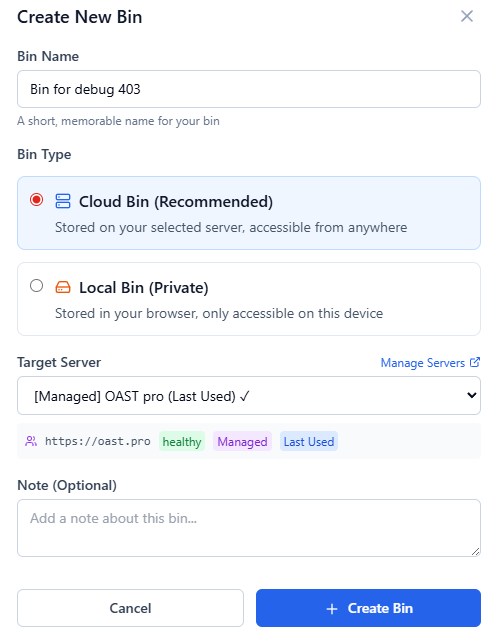
- Sign in to RequestBin and click New Bin.
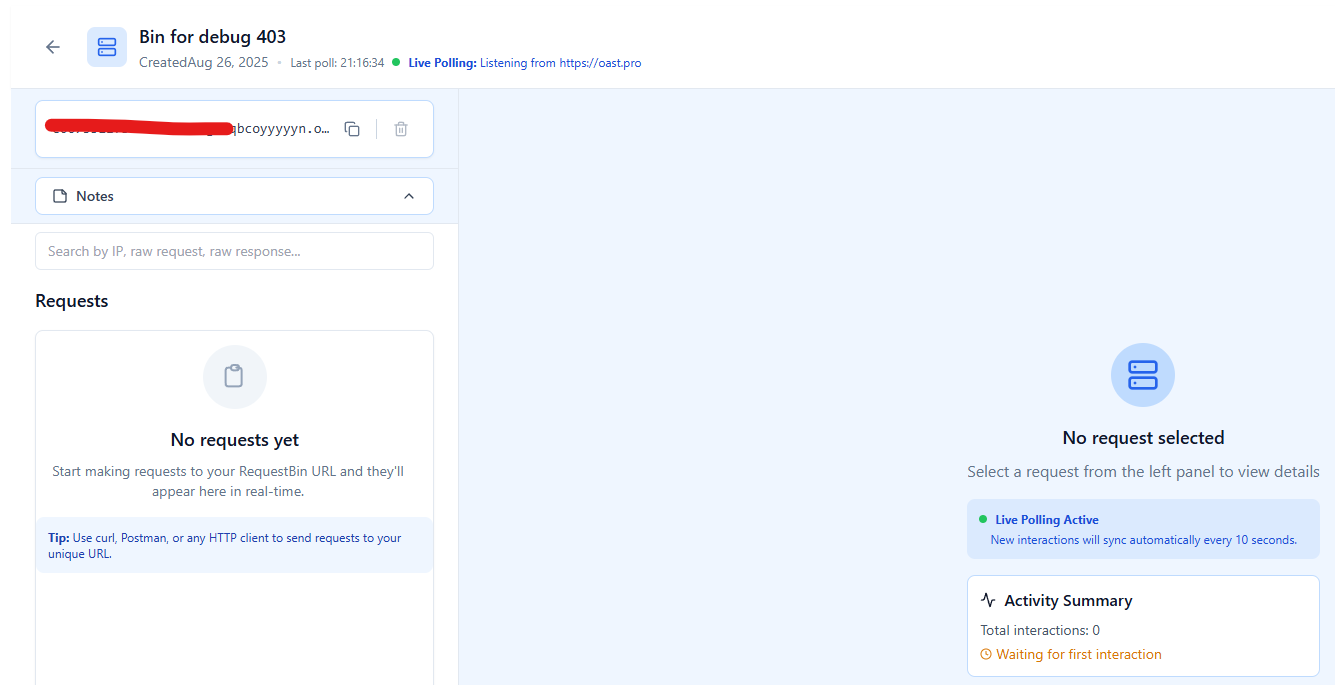
- Choose any OAST server, you’ll get a unique HTTPS URL, e.g.
https://abcd123.oast.pro
Step 2 — Point your client to the Bin temporarily
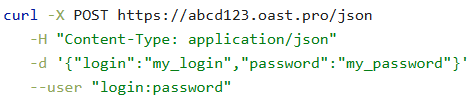
Replace the API’s URL with your Bin URL and send the exact same request (method, headers, body).
- Keep all headers you would normally send (e.g.,
Authorization,Content-Type,User-Agent, custom signatures). - If you use a library, just swap the base URL/endpoint.
Why do this? If the provider says your request is malformed or missing headers, RequestBin shows you the ground truth of what left your app.
Step 3 — Inspect the captured request
Open your Bin. You’ll see each request with method, timestamp, and payload preview. Click into one to inspect:
- Request line: Method + full path (verify trailing slashes).
- Headers:
Authorization,Content-Type,Accept,Origin,Referer,X-Forwarded-For, custom signing headers. - Query string: Verify encoding and required parameters.
- Body: JSON shape, field names, types, and null vs absent keys.
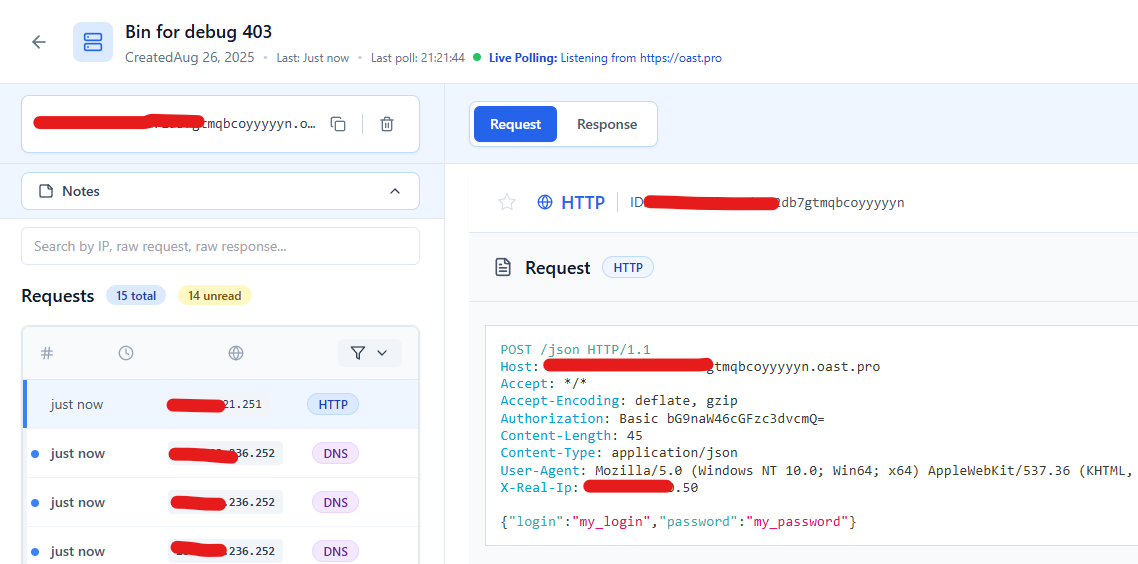
email, role, and active. Headers show Authorization: Bearer <redacted>, Content-Type: application/jsonStep 4 — Compare against the provider’s requirements
Match the captured request to the API docs:
- Are all required headers present?
- Is the token scope correct?
- Is the HTTP method what the endpoint expects?
- Any stray headers (e.g., a proxy’s
Host) that violate signature checks? - Does the body match the JSON schema (types, enums, nesting)?
Tip: Many signature schemes (HMAC, signed URLs) include the path and host in the signature. If your signature depends on the host, signing the request for the Bin host will not match the real API. Use RequestBin to confirm what your client actually signs, then re‑sign for the correct host when sending to the provider.
Step 5 — Fix and retest against the real API
After adjusting headers, scopes, method, or body shape based on what RequestBin revealed:
- Point your client back to the real API URL.
- Retest.
- If it still fails, repeat Step 2 and compare again. You’ll usually spot a small but critical mismatch.
Step 6 — Debugging inbound webhooks that your server rejects with 403
If your server returns 403 to a third‑party webhook:
- Temporarily point the webhook to RequestBin to see the provider’s outbound payload.
- Compare that payload to what your server expects (signature header name, timestamp skew, JSON shape).
- Adjust your verification logic accordingly.
Code snippets you can reuse
1) cURL: send the same request to RequestBin
# Replace with your Bin URL
BIN_URL="https://requestbin.net/r/abc123"

curl -i -X POST "$BIN_URL/api/users" \
  -H "Authorization: Bearer $TOKEN" \
  -H "Content-Type: application/json" \
  -H "Accept: application/json" \
  -H "Origin: https://app.example.com" \
  --data '{"email":"[email protected]","role":"admin","active":true}'
What to look for in RequestBin: headers present, body matches schema, method/path correct.
2) Node.js (fetch)
import fetch from "node-fetch";

const BIN_URL = "https://requestbin.net/r/abc123";

async function createUser() {
  const res = await fetch(`${BIN_URL}/api/users`, {
    method: "POST",
    headers: {
      "Authorization": `Bearer ${process.env.TOKEN}`,
      "Content-Type": "application/json",
      "Accept": "application/json",
      "Origin": "https://app.example.com"
    },
    body: JSON.stringify({
      email: "[email protected]",
      role: "admin",
      active: true
    })
  });

  console.log(res.status, await res.text());
}

createUser().catch(console.error);
3) Python (requests)
import os
import requests

BIN_URL = "https://requestbin.net/r/abc123"

payload = {"email": "[email protected]", "role": "admin", "active": True}
headers = {
    "Authorization": f"Bearer {os.environ.get('TOKEN')}",
    "Content-Type": "application/json",
    "Accept": "application/json",
    "Origin": "https://app.example.com",
}

r = requests.post(f"{BIN_URL}/api/users", json=payload, headers=headers, timeout=15)
print(r.status_code, r.text)
4) Example: your API returning 403 (Express)
import express from "express";
const app = express();

app.use(express.json());

app.post("/api/users", (req, res) => {
  const { role } = req.body;
  const scope = req.headers["x-scope"]; // example: "users:write"

  if (!scope || !scope.includes("users:write")) {
    return res.status(403).json({
      error: "forbidden",
      reason: "Missing scope users:write"
    });
  }

  if (role === "admin") {
    return res.status(403).json({
      error: "forbidden",
      reason: "Only superadmins can create admin users"
    });
  }

  res.status(201).json({ id: "usr_123", ...req.body });
});

app.listen(3000);
5) NGINX: simple block (causes 403)
location /internal/ {
    deny all;     # returns 403
}
If you’re debugging a 403 behind NGINX, confirm there isn’t an inherited deny all; or a stricter nested location block matching your path.
Special cases: CORS, CDNs, WAFs, and signed URLs
CORS preflight (browsers)
- A
403on the OPTIONS preflight usually means your server or CDN is refusing the origin/method/headers. - Verify server/CDN emits
Access-Control-Allow-Origin,Access-Control-Allow-Methods, andAccess-Control-Allow-Headersthat include your request. - Use RequestBin to confirm what the browser actually sends.
CDNs / storage / signed URLs
403often means the signed URL is expired or the signature doesn’t match headers (includingContent-Type) or the method.- Compare the signature inputs with the captured request from RequestBin.
WAF / bot protections
- Some WAFs block specific user agents, header patterns, or countries.
- If you can’t change the rule, call from an allowed IP, set a compliant UA, or request an exception.
Rate‑limit or abuse rules
- Double‑check docs: some platforms return
403(not429) for severe policy violations. - Ensure you’re not reusing one token across too many clients.
Best practices if you run an API
If you’re the API provider, make 403s easy to debug:
- Return structured JSON explaining the rule:
{
  "error": "forbidden",
  "reason": "insufficient_scope",
  "required_scopes": ["orders:write"]
}
- Include a stable error code (e.g.,
ERR_INSUFFICIENT_SCOPE) for support searches. - Set
WWW-Authenticatefor 401s (not 403s) so clients know how to authenticate. - Expose request identifiers (e.g.,
X-Request-Id) so clients can share logs with you. - Document IP ranges/origins and signature inputs precisely.
- Avoid leaking sensitive resource existence via error messages when necessary.
FAQ
What is 403 Forbidden?
403 Forbidden is an HTTP status that means the server understood your request but refuses to authorize it. You’re either missing the required permissions/roles/scopes, blocked by a policy (IP, origin, WAF), or violating a rule like expired signatures.
What is HTTP 403 Forbidden?
It’s the same status explained above, commonly seen as “403 HTTP Forbidden” or “403 Forbidden”. The fix is to align your request’s headers, method, and tokens with what the server allows.
How do I fix a 403 HTTP Forbidden quickly?
- Capture your exact outbound request with RequestBin.
- Compare headers/body/method against API docs (scopes, origin, signature inputs).
- Adjust token scopes, method, origin, IP, or JSON schema.
- Retest; repeat until the server authorizes the action.
Conclusion
A 403 HTTP Forbidden isn’t a dead end—it’s a precise signal that your request reached the server but violated an authorization rule. The fastest path to a fix is observability: capture the truth about your outbound request, compare it with what the API expects, and iterate.
Try this now:
- Create a Bin in RequestBin.
- Send your failing request to the Bin and inspect the headers/body.
- Adjust and retest against the real API.
Ready to make 403s a 5‑minute fix instead of a half‑day mystery? [Create your first Bin in RequestBin] and ship with confidence.