How to Internet Speed Test from Command Line (CLI)
Run accurate internet speed tests right from your terminal. Learn how to install and use the internetspeedtest CLI—an open-source, automation-ready tool for admins and DevOps who need reliable speed test command line results without a browser.

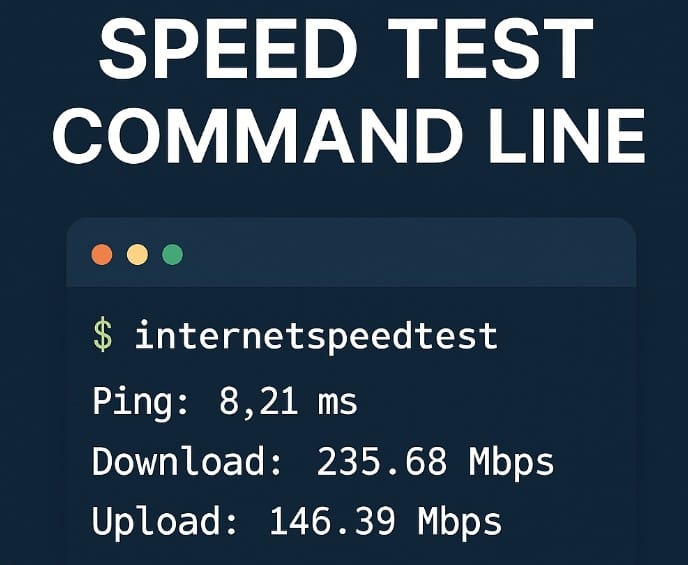
When you manage servers, run deployments, or work in headless environments, you often can’t just open a browser to test internet speed. That’s when command-line internet speed tests become essential — quick, scriptable, and automation-friendly.
In this post, we’ll explore how to test your connection directly from the terminal using the InternetSpeedTest.net CLI Tools — a powerful open-source solution built on LibreSpeed. We’ll compare it with other popular tools, run hands-on demos, and explain why this approach is ideal for system administrators, DevOps engineers, and network professionals.
Why Test Internet Speed from the Command Line?
For most admins and engineers, running a speed test from the terminal is not just about convenience — it’s about control and automation.
Common scenarios:
- You’re connected to a remote server via SSH.
- You need to monitor network performance across data centers.
- You’re building a CI/CD pipeline that depends on reliable bandwidth.
- You need a lightweight tool for diagnostics in containerized environments.
With a CLI-based tool, you can:
- Run tests without a GUI or browser.
- Automate network checks with cron or scripts.
- Integrate results into dashboards or alerts.
- Save outputs in JSON for easy parsing.
InternetSpeedTest.net CLI Tools — Lightweight, Open, and Self-Hostable
The InternetSpeedTest.net CLI Tools are built on LibreSpeed, a fully open-source speed test platform that doesn’t rely on external providers or tracking.
It’s:
- 🧩 Open-source and transparent — no hidden dependencies.
- 🖥️ Self-hostable — run your own server for internal testing.
- ⚡ Fast and minimal — works directly from the terminal.
- 🔒 Private — no data sent to third parties.
💡 Bonus: The same tool works for both public servers (like internetspeedtest.net) and private instances if you host LibreSpeed yourself.Installation (fast paths)
macOS (Homebrew)
brew tap internetspeedtest-net/tap
brew install internetspeedtest
# run it
internetspeedtest
Windows (PowerShell)
Invoke-WebRequest -Uri "https://github.com/internetspeedtest-net/internetspeedtest-cli/releases/download/v1.0.0/internetspeedtest-1.0.0-windows-amd64.zip" -OutFile "internetspeedtest.zip"
Expand-Archive -Path internetspeedtest.zip -DestinationPath .
.\internetspeedtest.exe
Linux (generic)
wget https://github.com/internetspeedtest-net/internetspeedtest-cli/releases/download/v1.0.0/internetspeedtest-1.0.0-linux-amd64.zip
unzip internetspeedtest-1.0.0-linux-amd64.zip
chmod +x internetspeedtest
./internetspeedtest
# optional system-wide
sudo mv internetspeedtest /usr/local/bin/
Quick start: the 30-second “speed test command line”
Run a full test with auto-selected server:
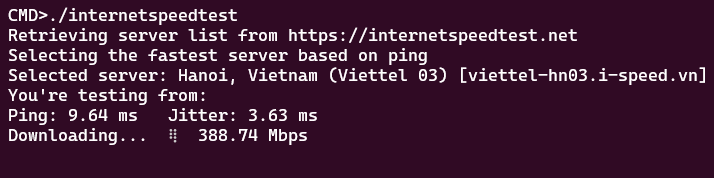
internetspeedtestYou’ll get latency (ping), download, and upload.
Retrieving server list from https://internetspeedtest.net
Selecting the fastest server based on ping
Selected server: Tokyo, Japan (A573) [librespeed.a573.net]
You're testing from: {"processedString":"113.190.210.50","rawIspInfo":""}
Ping: 121.91 ms Jitter: 61.18 ms
Download rate:  127.35 Mbps
Upload rate:    36.02 Mbps
Powered by https://internetspeedtest.net
Troubleshooting tips (admin-grade)
- CPU contention on VMs/containers: bandwidth tests can be noisy; pin CPUs or run off-peak.
- Asymmetric results: higher download than upload is common on consumer ISPs; confirm with multiple runs +/- 10% tolerance.
- Route-specific problems: compare
--serverin different regions to isolate long-haul congestion or packet loss. - Automation hygiene: store JSONL (one JSON per line) so it scales to months of data; rotate logs and backfill to TSDB if needed.
Conclusion
Tools like speedtest-cli (Ookla) and fast-cli (Netflix) are convenient, but they’re tied to proprietary ecosystems and typically require Python or Node runtimes. internetspeedtest is:
- Open source (MIT) and transparent — code and releases are public. internetspeedtest.net
- Self-host friendly — perfect if you later deploy private LibreSpeed servers for internal links.
- Binary-first & scriptable — designed for automation and structured outputs (CSV/JSON/JSONL). internetspeedtest.net
For privacy-sensitive or enterprise workflows, that combination is hard to beat. For anyone who lives in terminals — sysadmins, SREs, DevOps, network engineers — the speed test command line approach with internetspeedtest is the right mix of accuracy, automation, and openness. It runs anywhere, emits structured data, and avoids closed black boxes.