Content-Type: application/json vs text/plain — When to Use Each (with RequestBin)
Learn the difference between application/json and text/plain Content-Types. This guide explains when to use each, common developer pitfalls, and how to debug mismatched headers or invalid payloads using RequestBin with step-by-step examples.

TL;DR: Useapplication/jsonwhen your payload is valid JSON and will be parsed by a JSON parser. Usetext/plainwhen you’re sending raw text that shouldn’t be parsed as JSON (logs, plaintext messages, signed payload basestrings, etc.). Avoid the non-standardapplication/text.
Throughout this article we’ll explain how Content-Type works, the differences between application/json and text/plain, common pitfalls that break clients and webhooks, and step-by-step ways to use RequestBin to inspect, debug, and fix issues fast.
Why Content-Type matters
The Content-Type header tells the receiver how to interpret the request body. If it’s wrong or missing, your framework may:
- Reject the request (
415 Unsupported Media Type) - Try to parse with the wrong parser and throw (
SyntaxError: Unexpected token …) - Treat bytes as text (or vice versa)
- Mis-handle charsets, signatures, or compression
Rule of thumb: the Content-Type must match the actual format of the body you send.

The two media types you care about
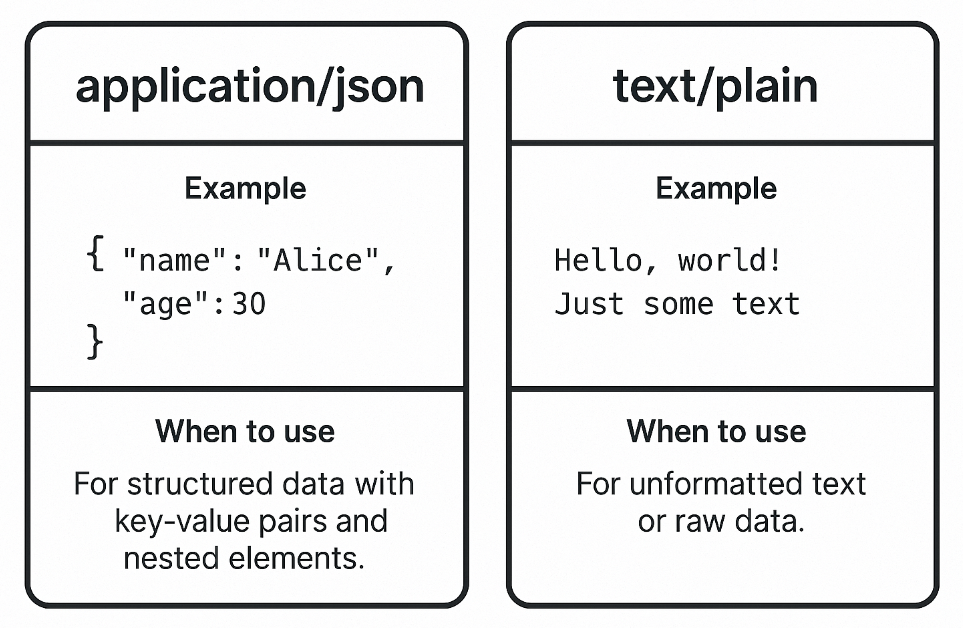
application/json
- What it is: Structured data encoded as valid JSON (
{},[], numbers, strings, booleans,null), typically UTF-8. - Use when: Your server/client expects JSON and will parse it into data structures.
- Common contexts: REST APIs, webhooks (Stripe, GitHub, etc.), mobile/SPA backends.
- Charset: JSON is UTF-8 by default. You can add
; charset=utf-8, but most libraries ignore it.
Example body (valid JSON):
{"event":"invoice.paid","amount":1999,"currency":"usd","metadata":{"source":"web"}}Header:
Content-Type: application/jsontext/plain
- What it is: Unstructured or “free-form” text.
- Use when: You’re sending plain text that shouldn’t be parsed as JSON (logs, messages), or you’re transporting a signature base string / hash / CSV snippet where JSON is not appropriate.
- Common contexts: Diagnostics, simple webhooks that send a one-liner status, signed challenge/response handshakes, manual tests.
Example body (text):
OKHeader:
Content-Type: text/plain; charset=utf-8⚠️ Avoidapplication/text: it’s non-standard, may be treated as a generic binary media type, and can confuse clients and middleware. Usetext/plainfor plain text.
application/json and text/plainQuick comparison
| Aspect | application/json | text/plain |
|---|---|---|
| Intent | Structured data for machines | Human-readable text / unstructured data |
| Parser | JSON parser (strict) | Read as string / stream |
| Typical errors | Not valid JSON, wrong charset, double-encoded JSON | Treated as JSON by mistake, missing charset for special characters |
| Best for | APIs, webhooks, typed contracts | Logs, simple status messages, signature base strings |
| Charset | UTF-8 by default | Specify charset=utf-8 for safety |
| Security note | Verify signature over raw bytes | Often used as basestring; avoid leaking secrets in text |
Common developer issues (and how to spot them with RequestBin)
- “I sent JSON but forgot the header”
Body is JSON, header is missing ortext/plain. The server uses the text parser, not JSON. - “I set
application/jsonbut sent a string”
Body is not valid JSON (e.g.,OK, or'{"foo":"bar"}'with single quotes). JSON parsers throw. - Double-encoding JSON
You callJSON.stringify()twice; the body becomes a JSON string literal (e.g.,"\"{\\\"a\\\":1}\""). - BOM/whitespace issues
Accidental BOM or leading text before{breaks strict parsers. - Signature verification fails
Provider signed the raw bytes, but the receiver re-serializes JSON before computing the HMAC. The bytes don’t match. - Wrong charset
Sending non-ASCII characters without proper encoding can cause mojibake.
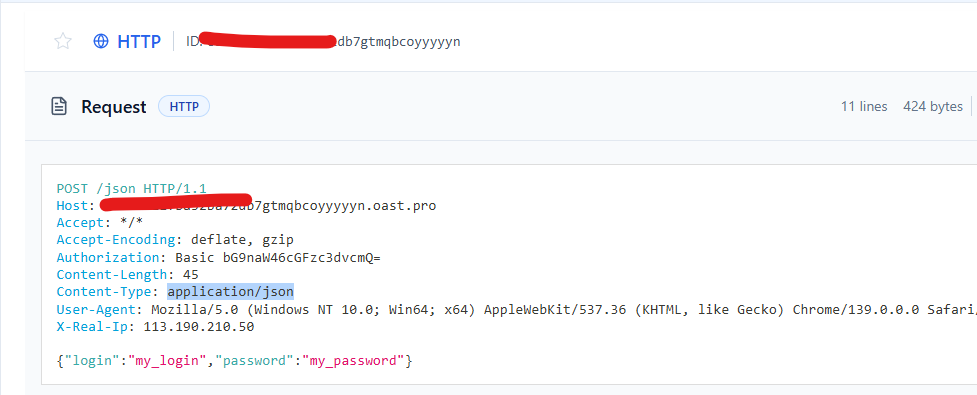
Step-by-step debugging with RequestBin
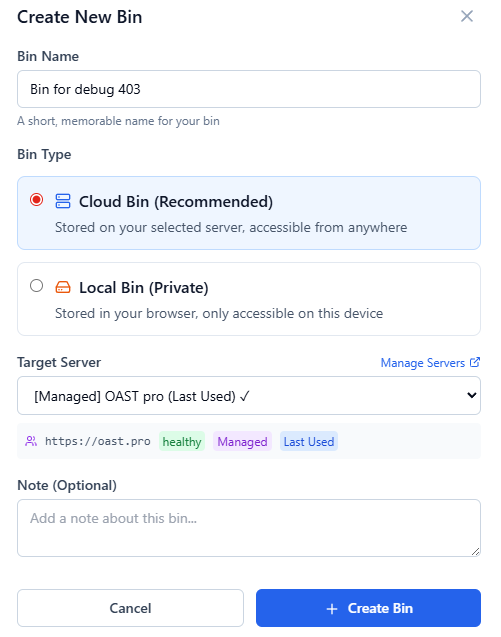
Step 1 — Create a bin
- Go to requestbin.net and click Create a RequestBin.
- You get a unique endpoint, e.g.:
https://abc123.requestbin.net
Step 2 — Send JSON correctly and incorrectly
A) Correct JSON (application/json)
curl -i https://abc123.requestbin.net \
  -H "Content-Type: application/json" \
  -d '{"login":"my_login","password":"my_password"}'
B) Incorrect JSON header (text/plain but JSON body)
curl -i https://abc123.requestbin.net \
  -H "Content-Type: text/plain" \
  -d '{"login":"my_login","password":"my_password"}'
C) Invalid JSON body (application/json but not JSON)
curl -i https://abc123.requestbin.net \
  -H "Content-Type: application/json" \
  -d 'OK'
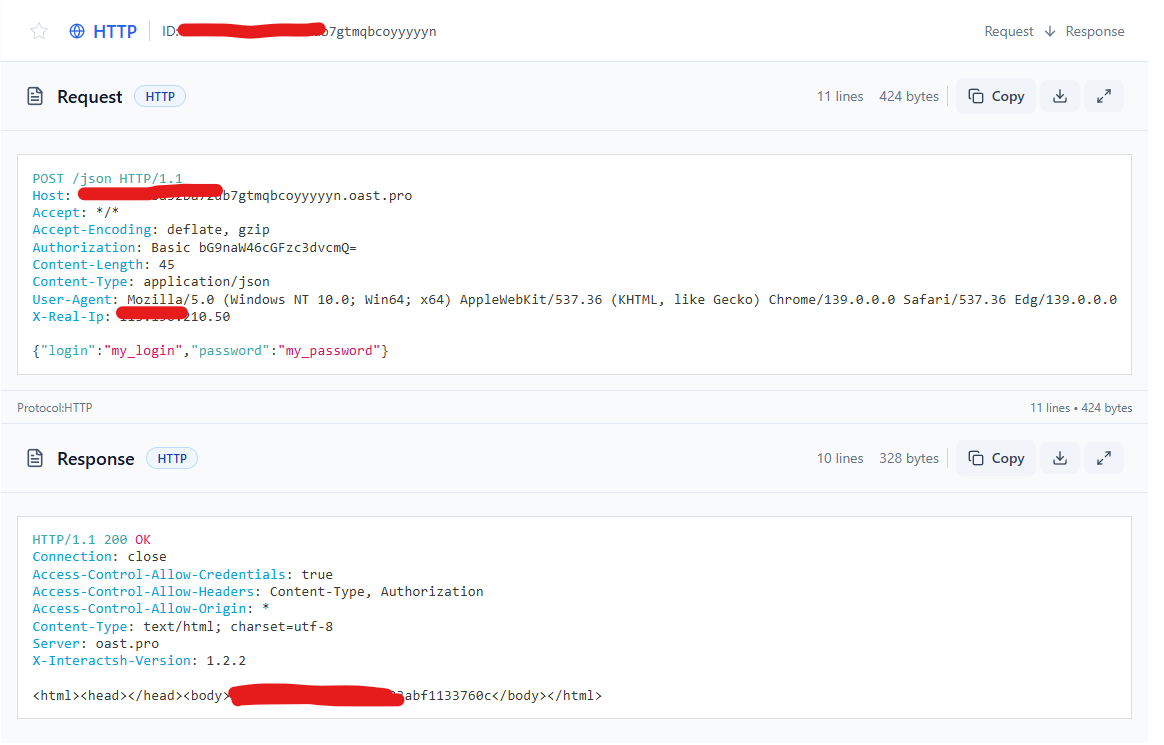
Return to RequestBin and open each request. Compare:
- Headers: Which parser would your app choose?
- Raw Body: Is it valid JSON? Are there stray quotes or BOM?
Step 3 — Fix your client code
JavaScript (fetch / Node)
await fetch("https://abc123.requestbin.net", {
  method: "POST",
  headers: { "Content-Type": "application/json" },
  body: JSON.stringify({"login":"my_login","password":"my_password"})
});
Python (requests)
import requests
r = requests.post(
    "https://abc123.requestbin.net",
    json={"login":"my_login","password":"my_password"}  # sets Content-Type and serializes
)
print(r.status_code)
Curl (safe quoting)
curl -i https://abc123.requestbin.net \
  -H "Content-Type: application/json" \
--data-binary '{"login":"my_login","password":"my_password"}'Use--data-binaryfor exact bytes;-dcan transform newlines on some systems.
Server-side handling: pick the right parser
Express (Node.js)
import express from "express";
const app = express();

// Important: configure parsers by media type
app.use(express.json());                       // handles application/json
app.use(express.text({ type: "text/plain" })); // handles text/plain

app.post("/ingest", (req, res) => {
  const ct = req.get("content-type") || "";
  if (ct.startsWith("application/json")) {
    // req.body is an object
    console.log("JSON payload:", req.body);
  } else if (ct.startsWith("text/plain")) {
    // req.body is a string
    console.log("Text payload:", req.body);
  } else {
    return res.status(415).send("Unsupported Media Type");
  }
  res.send("ok");
});

app.listen(3000, () => console.log("http://localhost:3000"));
What can go wrong
- Forgetting to register
express.text→ yourtext/plainbody is empty. - Registering a catch-all
express.text()without restrictingtype→ it consumes everything, breaking JSON parsing.

FastAPI (Python)
from fastapi import FastAPI, Request, HTTPException

app = FastAPI()

@app.post("/ingest")
async def ingest(request: Request):
    ct = request.headers.get("content-type", "")
    if ct.startswith("application/json"):
        try:
            data = await request.json()  # strict JSON parse
        except Exception:
            raise HTTPException(400, "Invalid JSON")
        return {"type": "json", "received": data}
    elif ct.startswith("text/plain"):
        text = await request.body()
        return {"type": "text", "received": text.decode("utf-8")}
    else:
        raise HTTPException(415, "Unsupported Media Type")
Tip: In FastAPI/Starlette, always check Content-Type and call the appropriate method: await request.json() for JSON, await request.body() for raw.
Signatures & “verify on raw bytes”
If your webhook provider signs requests (HMAC, Ed25519, etc.), you must verify the exact bytes received, before parsing or mutating the body—even whitespace differences change the signature.
Mismatched Content-Type can break verification because some frameworks automatically decode/normalize text.
Node example (HMAC SHA-256)
import crypto from "crypto";
import express from "express";

const app = express();
// Capture raw body for signature verification
app.use((req, res, next) => {
  let data = [];
  req.on("data", chunk => data.push(chunk));
  req.on("end", () => {
    req.rawBody = Buffer.concat(data);
    next();
  });
});

app.post("/webhooks", (req, res) => {
  const secret = Buffer.from(process.env.WH_SECRET || "whsec_xxx", "utf8");
  const ts = req.get("X-Webhook-Timestamp");
  const sig = req.get("X-Webhook-Signature"); // e.g., v1=abcd...

  const payload = Buffer.from(`${ts}.`).toString("utf8");
  const signed = Buffer.concat([Buffer.from(payload, "utf8"), req.rawBody]);

  const expected = crypto.createHmac("sha256", secret).update(signed).digest("hex");
  const provided = (sig || "").split("v1=")[1] || "";

  if (!crypto.timingSafeEqual(Buffer.from(expected), Buffer.from(provided))) {
    return res.status(400).send("Invalid signature");
  }

  // After verify, choose parser by Content-Type:
  const ct = req.get("content-type") || "";
  if (ct.startsWith("application/json")) {
    const json = JSON.parse(req.rawBody.toString("utf8"));
    // ...
  } else if (ct.startsWith("text/plain")) {
    const text = req.rawBody.toString("utf8");
    // ...
  }

  res.send("ok");
});

app.listen(3001);
Practical decision guide
Use application/json when:
- You need strong contracts between systems (APIs/webhooks).
- You expect to deserialize into objects/structs.
- You rely on schema validation, OpenAPI, or typed tooling.
- You want automated clients (SDKs) to “just work”.
Use text/plain when:
- You’re sending log lines, simple status/health text, or debugging output.
- You have human-in-the-loop steps (copy/paste text).
- You send a basestring to sign or a fixed hash (where JSON adds unnecessary quoting).
- You intentionally don’t want downstream JSON parsers to run.
Real-world tests you can run today
1) Validate your client sets the right header
# Good: JSON body + application/json
curl -i https://abc123.requestbin.net \
  -H "Content-Type: application/json" \
  --data-binary '{"msg":"hello","count":2}'

# Good: Plain text + text/plain
curl -i https://abc123.requestbin.net \
  -H "Content-Type: text/plain; charset=utf-8" \
  --data-binary 'Status: OK'
Open RequestBin and verify:
Content-Typematches: JSON → JSON; text → text.- Raw Body is exactly what you expect (no extra quotes, no BOM, no double-encoding).
2) Catch double-encoded JSON
Buggy code (double stringify):
const payload = JSON.stringify({ a: 1 });
fetch("https://abc123.requestbin.net", {
  method: "POST",
  headers: { "Content-Type": "application/json" },
  body: JSON.stringify(payload) // ❌ encodes a JSON string literal
});
In RequestBin, the Raw Body will look like:
"{\"a\":1}"Fix by sending payload directly, not JSON.stringify(payload).
3) Reproduce a signature mismatch
- Compute an HMAC over
timestamp + "." + raw_body. - Send headers
X-Webhook-TimestampandX-Webhook-Signature: v1=<hex>. - In RequestBin, confirm the exact bytes match what you signed (use
--data-binary).
If your server verifies a parsed JSON stringified again, it will fail. Always verify on raw bytes.
FAQ (quick hits)
- Should I include
charset?
For JSON, UTF-8 is assumed; including; charset=utf-8is harmless. Fortext/plain, include it if you have non-ASCII. - What about
application/x-ndjson?
Use it for JSON Lines (newline-delimited JSON objects). Don’t label NDJSON asapplication/json. - Can I send JSON with
text/plain?
You can, but parsers won’t treat it as JSON automatically. Only do this if the receiver expects raw text. - What happens if I omit
Content-Type?
Servers guess (content sniffing) or pick a default—this is fragile. Always set it.
Summary
application/json→ structured, machine-parsed data.text/plain→ human-readable or unstructured text.- Match the header to the actual body, or your framework will mis-parse or reject the request.
- RequestBin is the fastest way to see exactly what you sent—headers, raw bytes, and timing—so you can fix mis-matched headers, invalid JSON, and signature issues.
Spin up an endpoint on RequestBin now, send a couple of requests with both media types, and confirm your app parses exactly what you expect. You’ll catch subtle bugs (wrong header, double-encoding, stale signatures) before they hit production.