Introducing CurlConverter.net — A Fast, Private, Browser-Native cURL Conversion Tool by RequestBin
CurlConverter.net is a fast, privacy-focused cURL-to-code converter that runs entirely in the browser. Built by RequestBin, it bridges the gap between command-line testing and real HTTP debugging with a clean architecture based on Astro, React islands, and a Web Worker parsing engine.

When working with APIs, curl is often the universal starting point — quick to copy from documentation, easy to paste into a terminal, and globally understood.
But when it’s time to integrate an API into real application code, developers usually need something else: Python requests, JavaScript fetch, Go, PHP, or other client libraries.
At RequestBin, our mission has always been to help developers inspect, debug, and replay HTTP requests. But we repeatedly saw developers arriving with curl commands they wanted to convert before inspection.
That led us to build CurlConverter.net — a small, fast, browser-native tool for turning curl commands into real code with complete local privacy.
This post walks through the motivations, architecture, and integration with RequestBin.
Why Build Our Own Converter?
1. Privacy by design — everything runs in your browser
Most curl converters upload your command to a server for processing.
That means your API tokens, headers, and payloads may pass through infrastructure you don’t control.
We designed CurlConverter the opposite way:
- no backend
- no logging
- all parsing happens locally
- nothing leaves your browser
Privacy becomes a natural consequence of architecture, not a marketing claim.
2. A lightweight, developer-first workflow
CurlConverter aims to feel like a CLI tool with a GUI:
- instant load
- simple interface
- copy/paste → convert → done
No sign-in. No vendor lock-in. No multi-step wizard.
3. Deep integration with RequestBin
Once you convert a curl command into code, you often want to validate the request:
- Are the headers correct?
- Is the JSON encoded as expected?
- What exactly does the server receive?
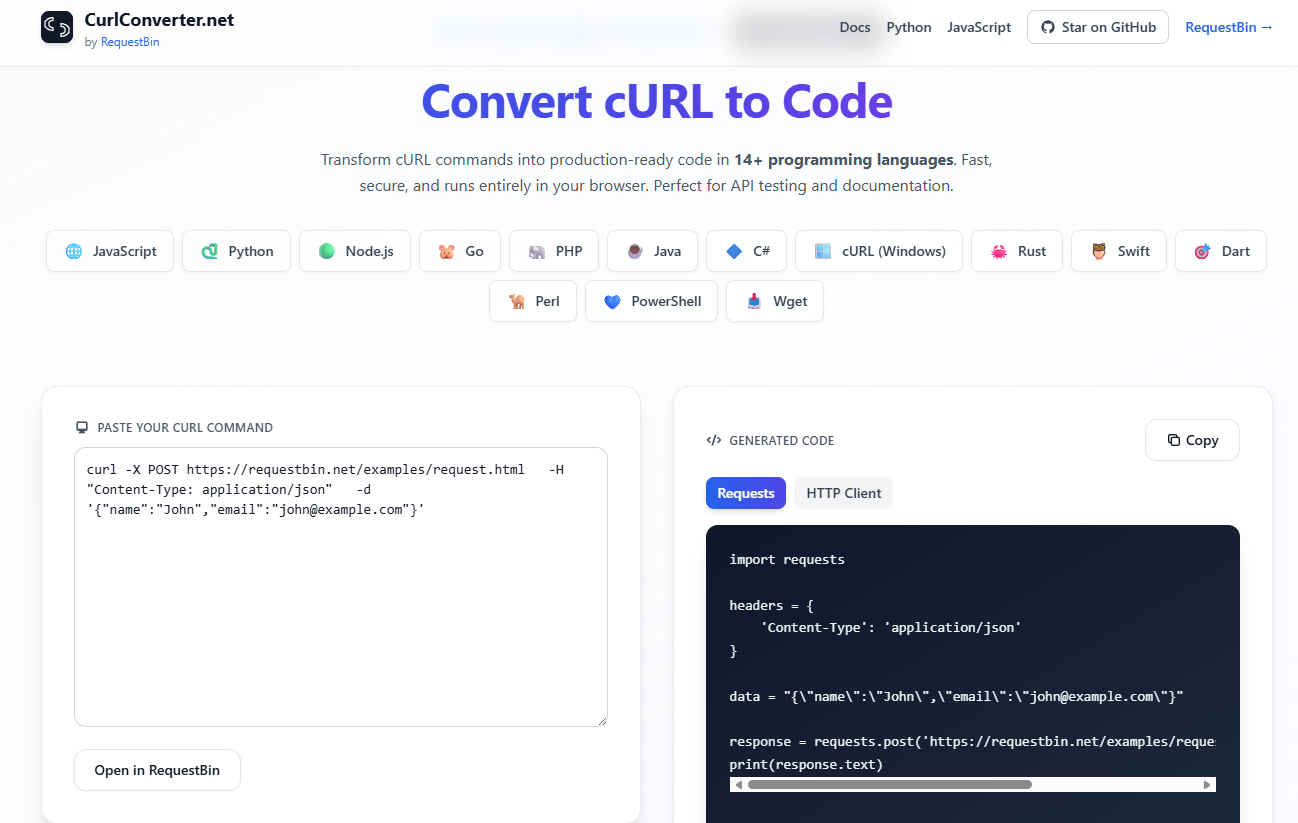
CurlConverter makes this seamless:
- Convert the curl command
- Click Open in RequestBin
- Inspect, replay, and share the request instantly
It’s a clean bridge from curl → code → real HTTP debugging.
Fully Open Source on GitHub
CurlConverter is now fully open-source under the RequestBin GitHub organization:
➡️ https://github.com/requestbin/curlconverter
We chose to open the source for three reasons:
1. Transparency
Because privacy is a core value, developers should be able to audit the code and verify that everything truly runs client-side.
2. Extendability
The community can help add support for more languages:
- Go
- PHP
- Java
- C#
- Rust
- …and many others
3. Reliability & longevity
Hosting the converter as an open tool ensures it remains usable and forkable, independent of infrastructure changes.
Issues and pull requests are welcome — especially around cURL edge cases and parsing improvements.
Under the Hood: Architecture Overview
CurlConverter.net is built as a pure static site. No backend, no database, no runtime server.
Astro for static pages & instant load
Astro renders the UI, docs, and landing pages to static HTML.
This gives us:
- zero cold starts
- no hydration for non-interactive parts
- SSR-level SEO
- compatibility with Vercel, GitHub Pages, Cloudflare Pages, or any CDN
React Islands for the interactive converter
The main converter UI is a React island — a small interactive component on an otherwise static page.
A dedicated Web Worker for parsing & conversion
All curl parsing runs in a Web Worker:
- isolates heavy work
- keeps UI smooth
- ensures no user data leaves the browser context
This Worker handles:
- method detection (
-X,--request) - headers (
-H) - JSON/form payload flags (
--data,-d,--data-raw) - URL extraction
- mapping into Python/JS templates
The result is a fast local conversion with no network overhead.
Integration with RequestBin
The “Open in RequestBin” button completes the workflow:
- The converter encodes the request metadata
- Sends it to RequestBin’s Curl Converter App
- Lets you inspect the actual HTTP request, replay it, modify it, or share it
This turns CurlConverter into a front door for deeper debugging workflows in RequestBin:
curl → convert → inspect → replay → debug → done.
Why Host It on a Separate Domain?
Keeping the tool at https://curlconverter.net provides two advantages:
1. Crystal-clear intent
Developers searching for curl conversion land in a dedicated, distraction-free tool.
2. A complementary ecosystem
CurlConverter acts as a lightweight satellite utility that naturally connects developers to RequestBin when deeper inspection is needed.
What’s Next?
We’re already working on:
- more language targets
- improved cURL parsing (multipart, cookies, auth flags)
- an embeddable
<iframe>mode for documentation sites - tighter RequestBin replay integration
And since the project is fully open-source, you’re welcome to contribute ideas or improvements.
🧪 Try It
- Convert curl commands:
https://curlconverter.net - Inspect or debug the generated request:
https://requestbin.net/apps/curl-converter - Browse the source code:
https://github.com/requestbin/curlconverter
CurlConverter is intentionally small — just enough to bridge the gap between curl and application code, while keeping all your data on your machine.
We hope it becomes a useful companion in your API debugging workflow.